Tessllation
tessellation에서는 주어진 mesh에서 더 많은 삼각형으로 쪼개는 작업을 수행합니다. 이를 통해, 메모리와 대역폭에서 장점을 갖습니다. 또한, GPU에 더 적은 데이터를 보내는 것이 가능해집니다. GPU가 tessellated된 정점을 그래픽 메모리에 저장하지 않기 때문에 자원에서 더 큰 효율을 얻을 수 있습니다. 굴곡에서 더 많은 정점과 삼각형을 생성하기에 더 부드럽게 만들 수도 있으며, 카메라 위치에 따른 정밀도를 다르게 설정할 수 있습니다.
Tessellation and Terrain
3D mesh가 너무나 커서 메모리 제한으로 인해 이를 모두 렌더링하지 못하는 경우가 존재합니다. 예를 들면 눈 위의 발자국이 그러한 예입니다. 이를 해결하기 위한 방법 중 하나로 세세한 표면 법선을 저장하는 텍스처 맵을 생성하여 mesh의 Geometry를 줄일 수 있습니다. 이를 normal mapping이라고 합니다. 이는 실루엣 가장자리는 매쉬로서 이용하지 않아, 항상 올바른 결과를 내지는 않지만 정점 수를 줄일 수 있습니다.
또 다른 방법으로는, 인스턴스화 기법으로 동일한 mesh를 사용하는 경우 복제하지 않고 여러 번 그리는 방법입니다. 이는 잔해, 나뭇잎 또는 군중을 표현할 때 유효하게 사용될 수 있습니다.
Tessellation은 geometry를 추가적인 메모리를 할당할 필요 없이 정점을 고정할 수 있습니다. geometry가 세분화된 후에는 displacement mapping과 같은 기술을 사용하여 지정된 정점의 위칠르 조정하여 긴 실루엣 모서리를 포함하여 표면에 대해 좀 더 자세한 정보를 만들 수 있습니다.
Patches
Metal은 삼각형과 사각형 형태의 두 패치 타입을 가집니다. tessellation은 결과적으로 항상 삼각형들을 생성하지만, 기본 geometry는 선택 가능합니다. tessellation을 위한 mesh를 선택할 때 기본 파이프라인이 자동적으로 패치 geometry를 삼각화하지 않는 것이 중요합니다. 사각형은 현대 그래픽 API에서 기본 primitive를 잘 사용되지 않아, 몇몇 포맷에서는 인코딩되지 않습니다.
Tessellation Factors
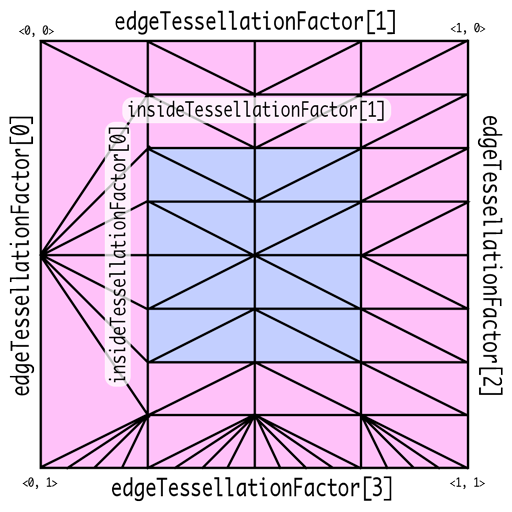
Tessellation Factor는 patch domain에서 얼마나 잘라야하는 지를 명시합니다. 삼각형의 경우는 세 변이 어떻게 변하는 지를 명시하는 edgeTessellationFactor과 내부 지역에서는 몇개로 나뉘는 지를 명시하는 insideTessellationFactor를 필요로 합니다. 사각형의 경우는 네 변에 대한 edgeTessellationFactor과 내부에 대해서는 두 개의 insideTessellationFactor를 필요로 합니다.
Metal Tessellator Pipeline
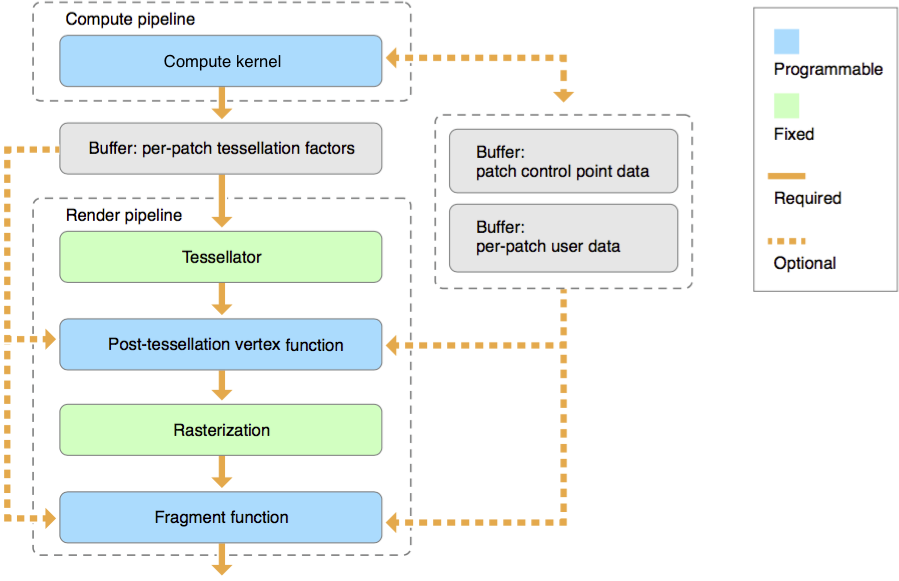
tessellation은 제어점의 집합으로 정의된 geometry의 임의의 배열인 patch 단위에 대해서 동작 합니다. 각 패치별 tessellation factor, 사용자 데이터 및 patch 제어점 데이터는 각각 별도의 MTL::Buffer 개체에 저장됩니다.
[Compute Kernel(Tessellation Kernel)]
Tessellation은 먼저 위의 Tessellation Factor를 결정하는 것부터 시작합니다. 이는 연산 셰이더를 통해 수행될 수 있지만 필수적이지는 않습니다. 이를 통해 패치 당 얼마나 나뉘어져야하는지를 결정하고, 패치 당 데이터 및 제어점을 연산, 변경합니다. 이는 hull shader와 유사한 역할을 수행합니다. 다음과 같은 코드의 형태를 띕니다
kernel void my_compute_kernel(...) {...}[Tessellator]
Tessellation Factor는 고정 함수인 tessellaotr 단계에서 Geometry를 세분화하고 이를 vertex shader로 전송하는데 사용됩니다. Hardware Tessellator에 해당합니다. 이는 다른 그래픽 API의 tessellator와 유사합니다
[Post-Tessellation Vertex Shader]
Post-tessellation vertex Shader는 일반적인 vertex shader와 유사하지만, 패치 도메인 내의 정점 속성과 좌표에 대해서만 동작합니다. 이는 domain-shader와 유사한 역할을 수행합니다.
[[patch(quad, 16)]]

vertex float4 my_post_tessellation_vertex_function(...) {...}
post-tessellation vertex function은 buffer, texture 혹은 샘플러를 자원으로 받고, [[stage_in]] 한정자를 선언하거나 버퍼에서 직접적으로 읽어 패치별 데이터나 패치 제어점 데이터를 사용할 수 있습니다. [[patch_id]]는 패치 식별자를, [[instance_id]]는 기본 개체값을 포함한 개체별 식별자를, [[base_instance]]는 기본 인스턴스 값을, [[position_in_patch]]는 평가되는 위치를 결정하는 값을 표기합니다.
Patch Draw Calls
모든 patch draw call은 baseInstance 인자로 지정된 값부터 시작하여 연속 배열 요소로 패치별 데이터와 패치 제어점 배열이 구성됩니다. 패치 데이터를 렌더링하기 위해서는 patch draw는 패치별 데이터와 패치 제어점 데이터를 가지고 있는데, 패치 데이터는 하나 이상의 버퍼에서 하나 이상의 매시의 모든 패치를 동시에 저장하고 있습니다. 연산 커널은 장면 의존적인 패치별 tessellation factor를 생성하기 위하여 실행됩니다. 연산 커널은 폐기되지 않는 패치에 대해서만 인자를 생성할 수 있습니다. 따라서 patch index 버퍼는 그릴 패치의 패치 ID를 식별하는데 사용됩니다.
[patchStart, patchStart+patchCount-1] 범위의 버퍼 인덱스(drawPatchIndex)는 데이터를 참조하는 데 사용됩니다. 패치별 데이터와 패치 제어 지점 데이터를 가져오는 데 사용되는 패치 인덱스가 연속되지 않은 경우 drawPatchIndex는 아래와 같이 patchIndexBuffer를 참조할 수 있습니다.
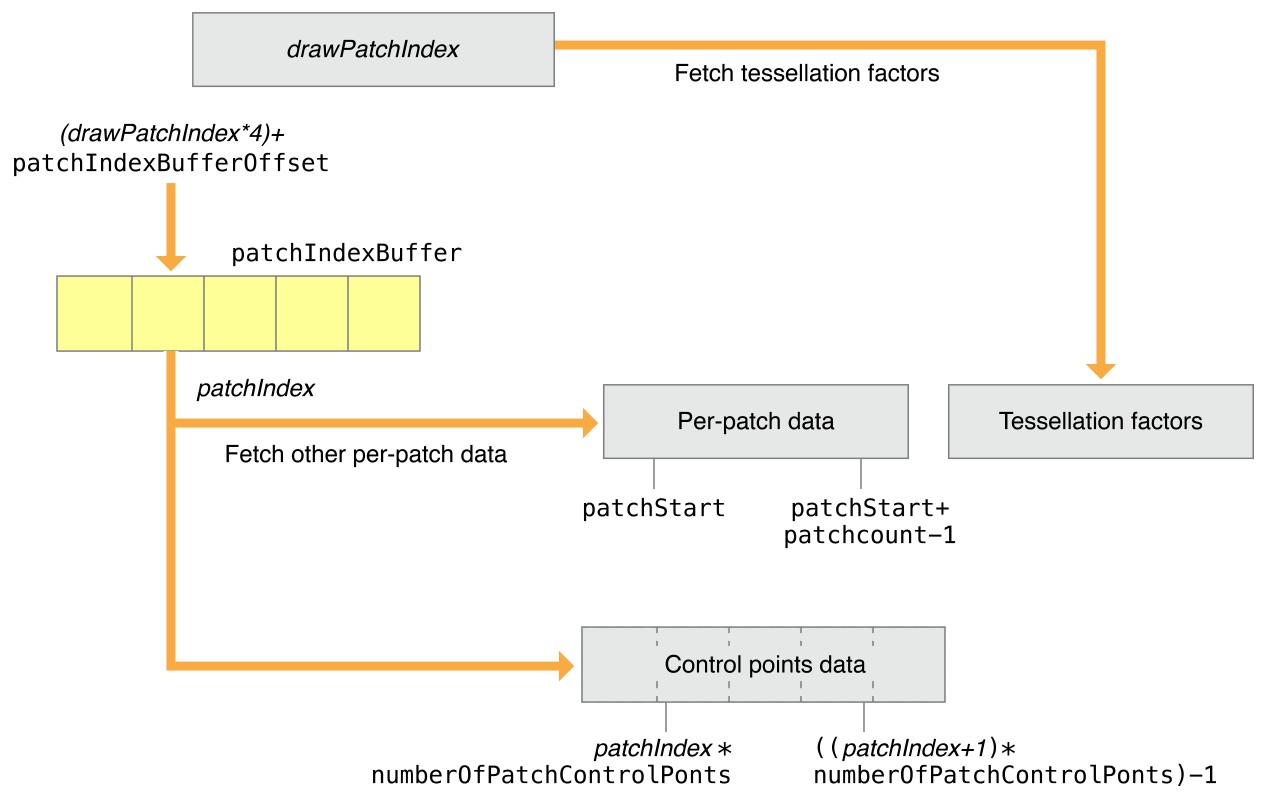
patchIndexBuffer의 각 요소에는 패치별 데이터와 패치 제어점 데이터를 참조하는 32비트 patchIndex 값이 포함되어 있습니다. patchIndexBuffer에서 가져온 patchIndex는 (drawPatchIndex*4) + patchIndexBufferOffset 위치에 있습니다.
패치의 제어점 지수는 다음과 같이 계산됩니다.
patchIndex * numberOfPatchControlPoints * ((patchIndex + 1) * numberOfPatchControlPoints) - 1
또한 patchIndexBuffer는 패치별 데이터 및 패치 제어 지점 데이터를 읽는 데 사용되는 patchIndex가 패치별 테셀레이션 계수를 읽는 데 사용되는 인덱스와 다를 수 있도록 지원합니다. 테셀레이터의 경우 drawPatchIndex는 패치별 테셀레이션 요인을 가져오는 인덱스로 직접 사용됩니다.
patchIndexBuffer가 NULL인 경우 drawPatchIndex와 patchIndex는 동일한 값을 가집니다.

제어점이 패치 간에 공유되거나 패치 제어점 데이터가 연속되지 않은 경우 drawIndexedPatches 방법을 사용해야 합니다. patchIndex는 지정된 controlPointIndexBuffer를 참조합니다. 이 버퍼에는 패치의 제어점 인덱스가 들어 있습니다. (tessellationControlPointIndexType은 controlPointIndexBuffer의 제어점 인덱스의 크기가 설명되며 uint16 혹은 uint32 형태이어야만 합니다).
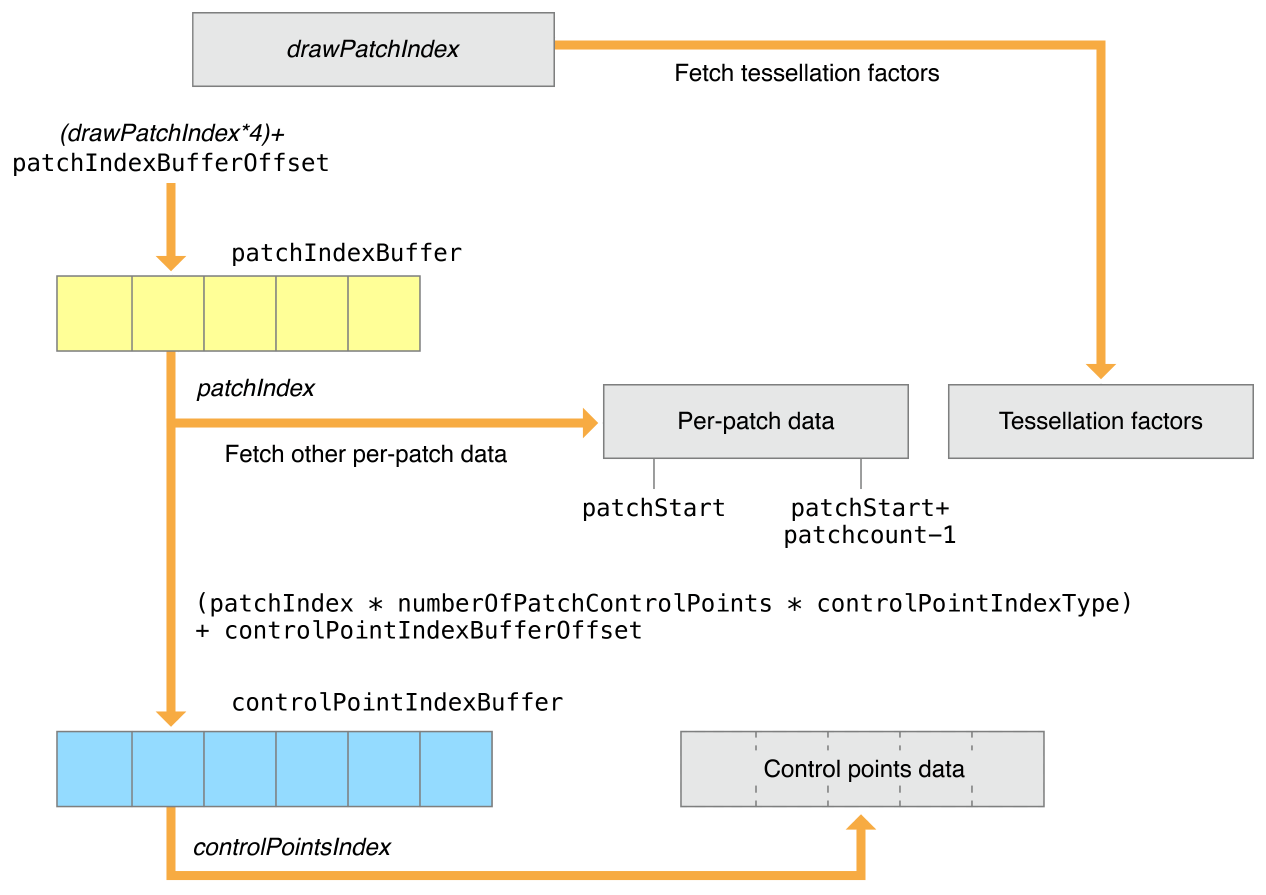
controlPointIndexBuffer에서 첫 번째 제어점 색인의 위치는 controlPointIndexBufferOffset + (patchIndex * numberOfPatchControlPoints * controlPointIndexType == UInt16 ? 2 : 4)과 같이 연산됩니다. 여러 제어점 색인은 첫 제어점 색인의 위치부터 시작하여 controlPointIndexBuffer에 연속적으로 저장되어야만 합니다.
Code
먼저 파이프라인을 만들어 봅시다.
그 이후에
MTL::Library* pTessellationLibrary = _pDevice->newLibrary( NS::String::string(kernelSrc, NS::UTF8StringEncoding), nullptr, &pError );

// Fetch the post-tessellation vertex function from the library
MTL::Function* pPostTessVertexFn = pTessellationLibrary->newFunction( NS::String::string("my_post_tessellation_vertex_function", UTF8StringEncoding) );
MTL::Function* pFragFn = pTessellationLibrary->newFunction( NS::String::string("fragmentMain", UTF8StringEncoding) );

// Configure the render pipeline, using the default tessellation values
MTL::RenderPipelineDescriptor* pDesc = MTL::RenderPipelineDescriptor::alloc()->init();
pDesc->colorAttachments()->object(0)->setPixelFormat( MTL::PixelFormat::PixelFormatBGRA8Unorm_sRGB );
pDesc->setVertexFunction( pPostTessVertexFn );
pDesc->setFragmentFunction( fragmentFunction );
pDesc->tessellationPartitionMode( MTL::TessellationPartitionMode::TessellationPartitionModePow2 );
pDesc->tessellationControlPointIndexType( MTL::TessellationControlPointIndexType::TessellationControlPointIndexTypeNone );
pDesc->tessellationOutputWindingOrder( MTL::Winding::WindingCounterClockwise );
pDesc->tessellationFactorScaleEnabled( false );
pDesc->maxTessellationFactor( 16 );
pDesc->tessellationFactorFormat( MTL::TessellationFactorFormat::TessellationFactorFormatHalf );
pDesc->tessellationFactorStepFunction( MTL::TessellationFactorStepFunction::TessellationFactorStepFunctionConstant );

// Build the render pipeline
NS::Error* pError = nullptr;
MTL::RenderPipelineState* m_tessPipeline = _pDevice->newRenderPipelineState( pDesc, &pError );
RenderPipelineDescriptor를 생성하는 것은 동일하지만, tessellation에 대해 설명을 부여해야 합니다. Metal에서 attribute buffer에서 자동적으로 제어점 데이터를 가져오는 것을 요청하기에, 버퍼 레이아웃의 StepFunction을 사용하여 정점 단위가 아닌 제어점 단위 데이터를 가져옵니다.
- tessellationFactorStepFunction은 새로운 factor을 어마나 자주 tessellation factor buffer에서 가져오는 지를 결정합니다. 여기서 constant는 모두 같은 factor를 사용한다는 뜻입니다.
- tessellationControlPointIndexType은 제어점에 인덱싱되었을 때 가져오는 값에 관련되어 있습니다.
실제 tessellation 함수들은 다음과 같이 쓰여질 수 있습니다,
[[patch(quad, 4)]]
vertex VertexOut vertex_subdiv_quad(
     PatchIn patch [[stage_in]],
     …
     float2 positionInPatch [[position_in_patch]])
{
    float3 p00 = patch.controlPoints[0].position;
    float3 p01 = patch.controlPoints[1].position;
    float3 p10 = patch.controlPoints[3].position;
    float3 p11 = patch.controlPoints[2].position;
    float3 modelPosition = bilerp(p00, p01, p10, p11, positionInPatch);

    // calculate clip-space position, etc.
    …
}
또한, Tessellation Factor들에 대한 구조체들은 다음과 같이 정의 가능합니다.
typedef struct {
    uint16_t edgeTessellationFactor[4];
    uint16_t insideTessellationFactor[2];
} MTLQuadTessellationFactorsHalf;

typedef struct {
    uint16_t edgeTessellationFactor[3];
    uint16_t insideTessellationFactor;
} MTLTriangleTessellationFactorsHalf;
이후에 이를 renderCommandEncoder에서 tessellationFactorbuffer를 설정해주고, drawPatch를 통해 이를 그리면 됩니다.
pRenderEncoder->setTessellationFactorBuffer(_visiblePatchesTessFactorBfr, 0, 0);
pRenderEncoder->drawPatches( 4, 0, TERRAIN_PATCHES*TERRAIN_PATCHES
                                   _visiblePatchesTessFactorBfr
                                   0, 1, 0 );
참고 :
https://www.raywenderlich.com/books/metal-by-tutorials/v3.0/chapters/19-tessellation-terrains
https://metalbyexample.com/tessellation/
https://develop-4-art.tistory.com/11?category=726118
'Projects > Metal - Document' 카테고리의 다른 글
| Using Argument Buffers (0) | 2022.08.26 |
|---|---|
| Metal-cpp 08, 09 : Use the GPU for General Purpose Computation and Mix Compute with Rendering (0) | 2022.08.25 |
| Metal-cpp 07 : Texture Surfaces (0) | 2022.08.25 |
| Metal-cpp 05 : Render 3D with Perspective Projection (0) | 2022.08.25 |
| Metal-cpp 04 : Draw Multiple Instances of an Object (0) | 2022.08.25 |